Stocks: Realtime Quotes Charts
- 4.8
- Rating
- 1.00M
- Installs
- Free
- Price
 Analysis by App-foxy
I use Stocks: Realtime Quotes Charts as a quick market dashboard rather than as a complete investing platform. That distinction matters. The app is built for checking prices, watching a personal list of companies, scanning charts, and catching related news without opening several separate tools. For someone who wants a practical way to keep an eye on markets during the day, that focused approach works well.
It is a free finance app from StockSpy Apps Inc., with optional in-app purchases ranging from $0.99 to $11.99 per item. The app is suitable for Everyone, runs on Android devices using Android 6.0 or later, and its current version is 13.5. It has been available since March 4, 2013, which helps explain why the experience feels more established than many newer stock widgets.
How I use it for a reliable daily market check
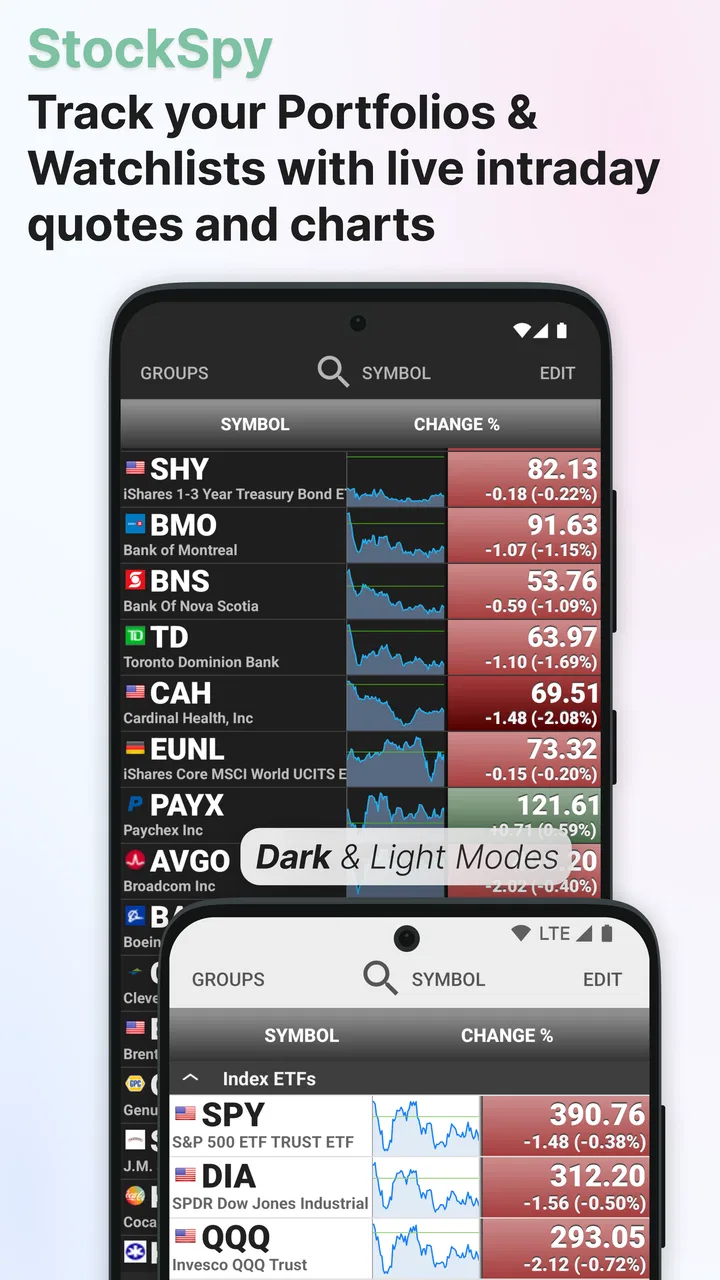
My usual workflow begins with the watchlist, not the chart. I first look at the companies I already care about, then open only the symbols that deserve a closer look. This prevents the common mistake of jumping between random market movers and confusing activity with useful information. The app is at its best when the watchlist reflects a real plan: long-term holdings, companies under research, or a small group connected to a particular sector.
You May Also Like

 Blood Strike: 2.5 Anniversary
Blood Strike’s Loadouts Turn Every Drop Into a Tactical Gamble
A close look at Blood Strike’s custom loadouts: how fast access to signature weapons reshapes its battle royale rhythm, rewards preparation, and narrows the gap between fights.

 Pandora - Music & Podcasts
Pandora’s Music Is Easy to Start, but Harder to Recover
Pandora’s strength is its low-effort path from a seed to a station. Its weak spot is how much confidence it asks you to place in connection, setup, and quiet recovery.

 8 Ball Pool
 Is Built on Rivalries, Rematches, and Routine
A close look at the rivalries, rematches, shared routines, and unanswered safety questions that turn a quick pool match into a persistent mobile community.

 Samsung Music
’s Quiet Strength Is Playing What You Already Own
Its reach comes less from spectacle than from dependable access to a personal library. That simplicity is both the app’s strongest retention engine and its ceiling.

 AccuWeather: Weather Radar
AccuWeather Review: A Quick, Clear Forecast for Everyday Decisions
For everyday plans, the best forecast is the one you can understand quickly. AccuWeather makes rain timing, radar, and local conditions easy to act on, with a few trade-offs.

 Hill Climb Racing
Why Hill Climb Racing Still Turns Crashes Into One More Run
A tiny car, a bumpy hill and one more upgrade: Hill Climb Racing keeps resurfacing because its simple chaos makes every near-miss feel personal.
More From Our News Desk



From there, I move to the quote view to check the latest available price information and the day’s movement. I treat that screen as a starting point rather than a trading command. A changing price can tell me that something deserves attention, but it does not explain why the move happened. That is where the chart and news tracker become more useful together.
The chart helps me change the scale of the question. Instead of asking only whether a stock is up or down right now, I can look for the broader shape of its movement. I find this especially helpful when a company appears unusually strong during a short check but has been moving sideways over a longer period. The visual context reduces the temptation to react to one prominent number.
After checking the chart, I scan the related news. This sequence is more useful than reading headlines first because I already know what the price is doing and can judge whether a headline seems relevant to the movement. It also keeps the app from becoming a noisy news reader. I am not trying to consume every story; I am trying to understand why a particular symbol has entered my attention.
A realistic everyday example is checking a watchlist during a lunch break. I might review a few holdings, notice one has moved differently from the rest of the market, open its chart, and then inspect the news connected with that symbol. If the change looks ordinary, I close the app. If the chart and headlines suggest something worth researching, I make a note for a deeper review later. That is a healthier workflow than making an immediate decision from a single quote.
The portfolio watchlist is also useful for separating observation from ownership. I can keep companies I own apart from companies I am merely considering, provided I organize the lists carefully. That small distinction makes the app more practical for research because it prevents a promising candidate from being mentally mixed with an existing position.
Why the basic layout works for casual and regular users
The main strength is concentration. Quotes, charts, news, and watchlists belong in the same place, so I spend less time rebuilding the same context in separate apps. A general finance portal may offer broader articles, economic calendars, analyst material, and account services, but it can also bury a simple price check under a lot of content. This app feels more direct when my question is simply, “What is happening with this symbol?”
It is also approachable for people who do not want a brokerage interface. A broker’s app is necessary for placing orders and managing an account, but many investors do not want to open that environment every time they are curious about a company. This app fills the gap between a phone’s basic market widget and a full trading platform.
That does not make it a replacement for a broker. I would not choose it as my only financial tool if I needed order execution, account balances, tax documents, detailed research reports, or a complete investment-planning workspace. Its value is in observation and organization, not in turning a market check into a transaction.
Settings I would check before building a watchlist
The most important setup decision is not visual customization; it is deciding what deserves a place in the watchlist. I recommend starting with a small, intentional group instead of importing every company that has ever caught your eye. A crowded list weakens the app’s main advantage because the screen becomes another stream of distractions.
I would create separate groups based on purpose. One can contain current holdings, another can contain research candidates, and a third can contain broader market references. This arrangement makes the same quote and chart tools more informative because every symbol has a reason for being there. It also makes a quick morning review faster: I can look at the relevant group instead of scanning an unstructured collection.
Chart preferences deserve attention as well. I do not use the same time perspective for every question. A short view helps me understand recent movement, while a longer view is better for judging whether the current price is unusual in context. The practical tip is to decide what question the chart should answer before changing the view. Otherwise, it is easy to keep switching timeframes until one produces a comforting picture.
News tracking also benefits from restraint. I prefer to use headlines as prompts for investigation, not as automatic explanations. A headline may be about a company but unrelated to the price movement I am watching, or it may describe an event whose effect is not yet clear. The app makes it convenient to find stories; the user still has to judge their significance.
Because optional purchases are available, I would examine what each one changes before paying. The free starting point is enough to decide whether the workflow suits you. I would not upgrade simply because a finance app displays a purchase prompt. First use the watchlists, quotes, charts, and news in a normal routine, then decide whether an extra feature solves a specific problem rather than adding another layer of information.
Small habits that make the app faster
Experienced use is mostly about reducing repeated decisions. I keep the watchlist compact, review it at consistent times, and open a chart only when a quote gives me a reason to investigate. That habit prevents endless refreshing and makes the app useful even when the market is quiet.
Another effective pattern is to compare related symbols instead of judging one company in isolation. If several companies from the same area are visible in the same watchlist, I can see whether a move looks company-specific or more broadly shared. This is not a substitute for proper sector research, but it is a quick way to avoid treating every price change as an isolated event.
I also use the app as a research inbox. When a headline catches my attention, I do not try to finish the entire investigation immediately. I note the symbol mentally or place it in a research-oriented list, then return later with more time. This turns the news tracker into a filter for future work rather than a source of rushed conclusions.
A useful discipline is to check the chart before reading too much commentary. If I read several headlines first, they can frame my interpretation of the price movement. Looking at the chart beforehand gives me an independent visual impression, even though it is still only one part of the analysis. This order is a small but meaningful protection against letting a dramatic headline dictate the whole story.
The app is also well suited to a “three-pass” routine. On the first pass, I scan the watchlist. On the second, I inspect only unusual or relevant symbols through their charts. On the third, I read the related news for those symbols. I find this more efficient than opening every item in depth, and it keeps the experience manageable on a phone.
For long-term investors, the best shortcut is probably consistency rather than speed. A short, repeatable review can reveal whether a company remains worth researching without encouraging constant reaction. For active traders, the same workflow may be too limited because a quote-and-chart dashboard does not provide the execution tools or specialized market controls they may require.
Where the app reaches its limits
The first limitation is that real-time market information can create a false sense of precision. A quote that updates quickly is still only a snapshot. It does not tell me whether a company is financially healthy, whether a valuation is reasonable, or whether a move will continue. I appreciate the immediacy, but I would never confuse it with analysis.
The chart is similarly useful within boundaries. It can show direction, range, and changes in momentum at a glance, yet a chart alone cannot explain business quality or future results. Users who rely heavily on financial statements, valuation models, earnings transcripts, or detailed technical studies may find the app too lightweight as their primary research environment.
The news tracker has a different weakness: convenience can encourage shallow reading. A list of headlines is excellent for discovering what to investigate, but it is not the same as understanding a story. I would still open full articles from a trusted source and check the date, context, and relationship to the company before making an investment judgment.
There is also a practical trade-off between simplicity and depth. The app is easier to approach than a professional terminal, but that simplicity means fewer layers of specialized information in the central workflow. A beginner may appreciate the clean path from watchlist to chart to news. An advanced investor may prefer a dedicated research service and keep this app only for quick monitoring.
I would also be careful with the word “portfolio.” A watchlist can represent holdings, but it is not automatically a complete record of an investment account. If you need exact cost basis, realized gains, dividend accounting, allocation analysis, or tax-ready records, a brokerage account or dedicated portfolio manager is the better choice. This app can support that process, but it should not be mistaken for the authoritative record.
Another consideration is notification pressure, if you choose to use any available alert-oriented behavior. Market apps can turn a calm routine into constant checking. My recommendation is to establish a reason for every alert or watchlist entry. If a symbol does not affect a decision, a research task, or a meaningful monitoring goal, it probably does not need daily attention.
Who should use it and who should choose something else
I would recommend this app to a beginner who wants to understand how a small watchlist behaves, to a long-term investor who wants a convenient second screen beside a broker, and to anyone who regularly follows several companies and wants quotes, charts, and related news in one place. It is especially useful for people who value a repeatable checking habit over a crowded collection of financial tools.
It is also a good fit for someone who wants to keep research separate from trading. Opening a neutral market dashboard can make it easier to observe a company without the pressure of an order button nearby. That separation is valuable for investors who tend to make decisions too quickly when they open their brokerage app.
I would skip it as a primary solution if your main need is trading execution, sophisticated technical analysis, detailed fundamental research, or formal portfolio accounting. In those cases, a broker, research platform, or portfolio-management service will likely serve you better. You can still keep this app for fast checks, but it should play a supporting role.
Privacy-conscious users should also make their own comfort judgment about using any finance-related service and review the app’s current permissions and policies before settling into a routine. I do not treat a convenient watchlist as a reason to share more information than necessary. The safest habit is to keep the app’s role narrow and avoid using it as a substitute for secure account management.
My verdict after making it part of a routine
The app’s reputation is strong: it holds a 4.8 average from around 27 thousand ratings, has about 4.3 thousand written reviews, and has passed one million installs. Those figures suggest that many people find the focused market-monitoring approach useful, and my experience fits that impression. The appeal is not that it does everything; it is that it brings the most common monitoring tasks into a straightforward sequence.
What I like most is the combination of a deliberate watchlist, a quick quote check, a chart for context, and news for follow-up. The strongest results come when I use those parts in that order and resist treating any single screen as a complete investment answer. The app rewards habits, not frantic tapping.
What holds it back is equally clear. It cannot replace a broker, a serious research platform, or a proper portfolio ledger. Users who expect every professional market feature in one free app may feel constrained, while users who only need occasional price checks may find even a watchlist more than they need.
Still, I would recommend trying the free version before considering any optional purchase. Build a small list, test a repeatable review routine, compare short and long chart perspectives, and use the news tracker as a research prompt. If that process matches the way you follow markets, Stocks: Realtime Quotes Charts is a practical companion for informed monitoring, not a shortcut to investment certainty.
FAQs for Stocks: Realtime Quotes Charts
01What is Stocks: Realtime Quotes Charts used for?
Stocks: Realtime Quotes Charts is designed to help users monitor financial markets from a mobile device. It provides access to stock quotes, price movements, charts, and related market information in one place. After exploring the app, I found it most useful for quickly checking watchlists and reviewing recent performance, rather than replacing a full desktop trading or research platform.
02Are the stock prices and market data shown in real time?
The application focuses on realtime quotes, but the exact update speed and availability can depend on the exchange, security, region, and the data provider. Some markets may offer live information, while others can be delayed or subject to subscription requirements. Before making an investment decision, users should verify important prices through an official exchange, broker, or another trusted financial source.
03Can I buy and sell stocks directly through the app?
Stocks: Realtime Quotes Charts is primarily a market-monitoring and analysis tool, not necessarily a complete brokerage service. Its features are intended for viewing quotes, charts, and tracking selected securities. Whether trading is available depends on the version and supported integrations. Users should not assume that seeing a stock price means they can place an order directly from the application.
04What chart and tracking features does the app offer?
The app is useful for following securities through visual price charts and customizable market lists. Users can typically search for instruments, review price changes over different periods, and organize stocks they want to monitor regularly. The experience is convenient for checking trends and comparing movements, although advanced investors may find that professional indicators, research tools, news coverage, or portfolio analysis are more limited.
05Is Stocks: Realtime Quotes Charts suitable for beginners?
Beginners can use the application as a simple way to become familiar with stock prices, market movements, and basic charts. However, the app does not automatically explain investment risk, valuation, diversification, or trading strategy. New investors should treat the information as educational and perform additional research before investing. Stock markets can be volatile, and the application should not be considered personalized financial advice.
Pros
- Real-time quotes update quickly for active market monitoring.
- Interactive charts make price trends easy to examine.
- Supports watchlists for tracking selected stocks in one place.
- Clean interface is suitable for both beginners and experienced traders.
- Useful market data is available without requiring a brokerage account.
Cons
- Some real-time data may depend on the selected exchange or provider.
- Advanced technical indicators may be limited compared with pro platforms.
- Ads or upgrade prompts can interrupt the free experience.
- Stock coverage and features may vary by country or market.
- The app is for research only and does not support direct trading.

Stocks: Realtime Quotes Charts
Gallery